
If you want multi-color output with the least setup, pick the Bambu Lab P2S Combo or the Creality K2 Combo (A); if you want separate toolheads that cut purge waste, pick the Snapmaker U1 or the FLASHFORGE Creator 5 Pro; and if you need the largest build area, pick the QIDI Max4 Combo. That split decides this group more than top speed, because three models state 600 mm/s, one states 800 mm/s, and the Snapmaker U1 states only 5X fast printing with no mm/s figure.
Two models use a filament-changing system, two use four independent toolheads, and one pairs a large build volume with a heated chamber and high-temperature nozzle. Footprint varies from 16.0 inches long to 28.0 inches long, so bench space should be checked before speed or color count.
As an Amazon Associate, we earn from qualifying purchases.


Pick by Your Need
- Best overall: Bambu Lab P2S Combo. Balanced speed, drying and chamber control in an 18.0 by 22.0 inch footprint.
- Best for multi-color count: Creality K2 Combo (A). Four CFS units support up to 16 colors from one system.
- Best for low purge waste: Snapmaker U1. Four preloaded toolheads swap in 5 seconds instead of purging filament.
- Best for engineering filaments: FLASHFORGE Creator 5 Pro. A 65°C heated chamber and enclosed frame suit ABS, PC and PA.
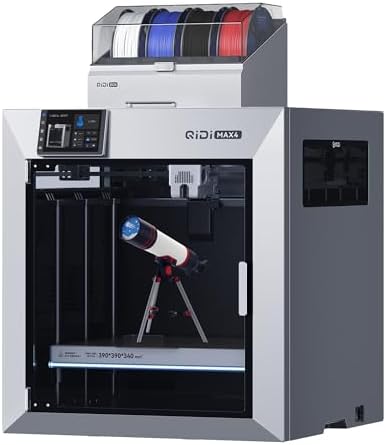
- Best for large parts: QIDI Max4 Combo. A 390 by 390 by 340 mm build volume handles big parts in one piece.
Quick Answer
The P2S Combo is the balanced default, with 600 mm/s speed, drying up to 65 °C and a 50 °C chamber. The U1 and Creator 5 Pro suit buyers who want four toolheads and less purge waste, while the Max4 Combo suits buyers who need a 390 by 390 by 340 mm build volume and can accommodate its 28.0 by 28.0 by 30.0 inch size and 120.0 pound weight.
Comparison Table
| Product | Best for | Key stated figure | Trade-off | Buy |
|---|---|---|---|---|
| Bambu Lab P2S Combo | Balanced multi-color work | 600 mm/s top speed | No build volume is stated | View on Amazon |
| Creality K2 Combo (A) | Up to 16 colors | 4 CFS units for 16 colors | No weight is stated | View on Amazon |
| Snapmaker U1 | Fast tool changes | 5 second tool changer | No heated chamber temperature is stated | View on Amazon |
| FLASHFORGE Creator 5 Pro | Engineering filaments | 65°C heated chamber | No build volume is stated | View on Amazon |
| QIDI Max4 Combo | Large single-piece parts | 390 × 390 × 340 mm build volume | Largest footprint at 28.0 × 28.0 × 30.0 inches | View on Amazon |
Decision Guide
If you need multi-color prints without separate toolheads, choose the P2S Combo or the K2 Combo (A). The P2S Combo uses the AMS 2 Pro and adds drying up to 65 °C, while the K2 expands to four CFS units and up to 16 colors. For prints using two or three colors, drying and a 50 °C chamber may matter more than a 16 color ceiling.
If you need to reduce purge waste, choose a toolhead model. The U1 states a 5 second changer and four preloaded toolheads. The Creator 5 Pro states a 7 second FlashSwap changer and four toolheads. The U1 is faster by 2 seconds on the stated figures, while the Creator 5 Pro adds a 65°C heated chamber the U1 listing does not state.
If you need a heated chamber, compare the stated figures. The Creator 5 Pro states up to 65°C, the Max4 Combo states 65℃, and the P2S Combo states 50 °C. The K2 and U1 listings state no chamber temperature, so buyers planning ABS, PC or PA work should weight the models that state chamber heat.
If you need a large part without splitting it, choose the QIDI Max4 Combo. It is the only listing that states a build volume, at 390 by 390 by 340 mm, and it states the highest speed at 800 mm/s. At 28.0 by 28.0 by 30.0 inches and 120.0 pounds, it needs far more room than the Creator 5 Pro at 16.0 by 14.0 by 18.0 inches and 39.0 pounds.
If you need the smallest footprint, measure all three dimensions. The Creator 5 Pro has the shortest stated length at 16.0 inches. The K2 is close at 16.93 by 16.54 inches, but taller at 21.06 inches. The U1 is 22.6 inches long, 13.0 inches wide and 14.2 inches high, trading length for narrower width and lower height.
Check the product page for current details before ordering.
1. Bambu Lab P2S Combo — Best overall
The P2S Combo takes a filament-system approach rather than separate toolheads, pairing the printer with the AMS 2 Pro for multi-color and multi-material work. It states a top speed of 600 mm/s, setup in 15 minutes, filament drying up to 65 °C and a chamber held at 50 °C. Its stated size is 18.0 inches long, 22.0 inches wide and 18.0 inches high.
| Spec | From the listing |
|---|---|
| Color | Grey |
| Size | P2S Combo (With AMS 2 Pro) |
| Length | 18.0 inches |
| Width | 22.0 inches |
| Height | 18.0 inches |
| Weight | The listing does not state it |
2. Creality K2 Combo (A) — Best for multi-color count
The K2 Combo (A) states the widest color expansion here, with four CFS units supporting up to 16 colors, which the listing presents as a way to reduce later painting. It also states 600 mm/s speed and a pre-assembled, plug and play setup. Its stated size is 16.93 inches long, 16.54 inches wide and 21.06 inches high, making it tall for its footprint. Supported materials stated include PLA, PETG, ABS and PLA-CF.
| Spec | From the listing |
|---|---|
| Color | K2 Combo (A) |
| Size | K2 Combo (A) |
| Length | 16.93 inches |
| Width | 16.54 inches |
| Height | 21.06 inches |
| Weight | The listing does not state it |
3. Snapmaker U1 — Best for low purge waste
The U1 uses four independent toolheads instead of a single nozzle fed by changing filament, and its SnapSwap system states a 5 second tool change. The listing states 5X faster printing and 5X less waste compared with traditional filament-changing systems, because preloaded toolheads swap rather than purge. It also states that rigid and flexible materials, water-soluble supports and engineering materials can be combined in one print, and its stated size is 22.6 inches long, 13.0 inches wide and 14.2 inches high, the lowest height and narrowest width here. Skip it if you need a stated heated chamber temperature, because no chamber temperature is stated.
| Spec | From the listing |
|---|---|
| Color | white |
| Length | 22.6 inches |
| Width | 13.0 inches |
| Height | 14.2 inches |
| Weight | The listing does not state it |
| Build volume | The listing does not state it |
4. FLASHFORGE Creator 5 Pro — Best for engineering filaments
The Creator 5 Pro also uses four toolheads, with a 7 second FlashSwap changer that the listing states switches nozzles without flushing filament, cutting purge waste. Its distinguishing figure is the enclosed frame with a heated chamber up to 65°C, which the listing links to printing ABS, PC and PA with less warping. It states 600 mm/s speed, a CoreXY structure and linear rails. At 16.0 by 14.0 by 18.0 inches and 39.0 pounds, it is the lightest of the two listings that state a weight.
| Spec | From the listing |
|---|---|
| Color | black |
| Length | 16.0 inches |
| Width | 14.0 inches |
| Height | 18.0 inches |
| Weight | 39.0 pounds |
5. QIDI Max4 Combo — Best for large parts
The Max4 Combo is built around size, stating a 390 by 390 by 340 mm build volume, a top speed of 800 mm/s and an acceleration of 30,000 mm/s². It also states a 370℃ nozzle, a 65℃ active heated chamber and a 40 mm³/s high-flow hotend with a hardened steel nozzle for PLA, ABS and abrasive materials including carbon fiber-reinforced nylon. Closed-loop motors on the X and Y axes and dual Z lead screws are stated. Skip it if bench space is tight, because its stated size is 28.0 by 28.0 by 30.0 inches, with a stated weight of 120.0 pounds.
| Spec | From the listing |
|---|---|
| Color | Grey |
| Size | MAX4 Combo |
| Length | 28.0 inches |
| Width | 28.0 inches |
| Height | 30.0 inches |
| Weight | 120.0 pounds |
Shopping Checklist
- Measure bench space first and compare it with each model’s stated dimensions.
- Check the stated build volume where given, and note where it is not stated.
- Check chamber temperature, nozzle temperature and materials against your planned filaments.
- Check how color changes are handled and what purge approach is stated.
- Check the return window on the product page and compare finalists on dimensions and weight.
FAQ
How do I choose between a filament system and separate toolheads?
A filament system such as the AMS 2 Pro or the CFS units changes filament at one nozzle, while a toolhead system swaps between preloaded toolheads. Based on the listing details, toolhead models state lower purge waste, while filament systems state broader color counts, up to 16 colors for the K2 Combo (A). Choose by whether color count or purge reduction matters more.
Does a heated chamber matter for every material?
No. The listings link heated chambers to engineering materials such as ABS, PC and PA, and to reducing warping in those materials. If you plan to print those materials, compare the stated figures: 65°C for the Creator 5 Pro, 65℃ for the Max4 Combo and 50 °C for the P2S Combo.
What should I check if I want to print large parts?
Start with the stated build volume, which only the QIDI Max4 Combo gives here, at 390 by 390 by 340 mm. For the other four, no build volume is stated, so part fit cannot be settled from outer machine dimensions alone. Then check footprint and stated weight so the printer itself fits the space.
Final Verdict
For most buyers, the P2S Combo offers the most balanced stated figures: 600 mm/s speed, drying up to 65 °C and a 50 °C chamber. Buyers focused on color count should look at the K2 Combo (A), and buyers focused on purge waste should compare the U1 and Creator 5 Pro. The Max4 Combo stands apart for size and speed, provided its footprint and weight fit.
Prime covers fast, free delivery on eligible items. See whether a Prime free trial is available for your account.
Check Prime on Amazon →Related Guides
No related guides were supplied for this article.
Product and ASIN Reference
| Product | ASIN | Buy |
|---|---|---|
| Bambu Lab P2S Combo | B0FT818HCH | View on Amazon |
| Creality K2 Combo (A) | B0FC2CZ11V | View on Amazon |
| Snapmaker U1 | B0GYP89RTN | View on Amazon |
| FLASHFORGE Creator 5 Pro | B0GST2MH14 | View on Amazon |
| QIDI Max4 Combo | B0GF87BKPD | View on Amazon |
Write Your Review
No reviews yet. Be the first to share your experience!