
Pick the StarTech 4-Bay if your work is cloning or erasing bare SATA drives, pick the LaCie 1big Dock if you want one desk unit combining a 24TB drive with card readers and laptop charging, and pick the A1DFDFGOQSFG or ZjBfddnmm docks if you only need one or two bare drives connected. The ORICO DataMatrix Mini sits between those poles: a docking station with a 2TB SSD and a 20TB hard drive built in.
Two of the five, the LaCie and the ORICO, carry their drives inside the enclosure, so they dock a laptop rather than accepting loose drives. The other three are open docks for bare 2.5 and 3.5 inch SATA drives, with no built-in storage stated.
As an Amazon Associate, we earn from qualifying purchases.


Pick by Your Need
- Best for cloning work: StarTech 4-Bay Duplicator and Eraser. Four bays and standalone 1:3 cloning at up to 4.2 GB/min cover duplication without a computer.
- Best desk hub with storage: LaCie 1big Dock 24TB. A built-in 24TB drive, CF and SD slots and up to 60W of charging in one unit.
- Best tiered storage: ORICO DataMatrix Mini 22TB. A 2TB NVMe SSD and a 20TB hard drive share one enclosure with hardware RAID.
- Best compact single bay: A1DFDFGOQSFG SATA Dock. At 194 x 118 x 31 mm it is the smallest dock here, for one 2.5 or 3.5 inch drive.
- Best simple dual bay: ZjBfddnmm Dual Bay Dock. Two bays, offline clone and a power switch cover two-drive work.
Quick Answer
For bare-drive work, the StarTech 4-Bay is the most capable dock here, with four bays, standalone cloning and erasing, and USB plus eSATA connections. For storage and docking in one box, the LaCie 1big Dock pairs 24TB built in with Thunderbolt 3 and 60W charging, while the ORICO splits 22TB between an SSD tier and a hard drive tier.
Comparison Table
| Product | Best for | Key stated figure | Trade-off |
|---|---|---|---|
| LaCie 1big Dock 24TB | Docking a laptop plus built-in storage | 24TB built-in drive; up to 60W charging | Drive is built in; no open bays for bare drives |
| StarTech 4-Bay Duplicator and Eraser | Cloning and erasing bare SATA drives | 4 bays; cloning up to 4.2 GB/min | No built-in storage; 11.2 inches long |
| ORICO DataMatrix Mini 22TB | Tiered SSD and hard drive storage | 22TB: 2TB SSD plus 20TB hard drive | Storage is built in; no dimensions or weight stated |
| A1DFDFGOQSFG SATA Dock | One bare drive, small footprint | 194 x 118 x 31 mm; drives up to 18TB | One bay only; no weight or clone function stated |
| ZjBfddnmm Dual Bay Dock | Two bare drives with offline clone | 2 bays; 12V 3A power adapter | No dimensions, weight or drive capacity stated |
Decision Guide
If you need to clone one drive onto several others, choose the StarTech 4-Bay: it is the only dock here with four bays, and its listing states standalone cloning at up to 4.2 GB/min plus Quick Erase and Secure Erase modes. For two drives with cloning that runs without a computer, choose the ZjBfddnmm Dual Bay, with offline clone stated across its 2 bays. For one drive at a time, the A1DFDFGOQSFG dock supports drives up to 18TB.
If you need storage and a laptop dock in one unit, choose between the built-in models by capacity and connection. The LaCie states 24TB on a 7200 RPM enterprise class drive, dual Thunderbolt 3 ports and charging up to 60W. The ORICO states 22TB split as a 2TB SSD plus a 20TB hard drive, a 10Gbps USB 3.2 Gen2 interface, and hardware RAID 0, 1 and SPAN.
If desk space decides it, the A1DFDFGOQSFG is the smallest unit with stated dimensions at 194 x 118 x 31 mm; the LaCie measures 5.71 x 12.2 x 9.45 inches and the StarTech 11.2 x 6.8 x 3.8 inches.
1. LaCie 1big Dock 24TB — Best Desk Hub with Built-In Storage
The 1big Dock is an external hard drive and laptop docking station in one enclosure, aimed at filmmakers centralizing desktop peripherals. Its 24TB Seagate IronWolf Pro drive is the largest built-in capacity among the five listings, and the dock side adds CF and SD card slots, a DisplayPort 1.4 output, a USB hub and dual Thunderbolt 3 ports. Charging reaches up to 60W through Thunderbolt 3.
Pros
- 24TB built-in drive is the largest stated capacity of the five
- 5-in-1 docking with CF and SD slots, DisplayPort 1.4 and dual Thunderbolt 3
- Charging stated at up to 60W, with up to 70W pass-through
Cons
- No open bays, so bare 2.5 or 3.5 inch drives cannot be docked
- At 3.75 pounds it is the heavier of the two listings stating a weight
Skip it if your drives are bare SATA disks needing open bays; this unit stores everything on its built-in 24TB drive.
| Spec | From the listing |
|---|---|
| Capacity | 24TB built-in hard drive |
| Dimensions | 5.71 x 12.2 x 9.45 inches |
| Weight | 3.75 pounds |
| Charging | Up to 60W through Thunderbolt 3 |
2. StarTech 4-Bay Duplicator and Eraser Dock — Best for Cloning and Erasing Bare Drives

This 4-bay unit is a docking station built around duplication and erasing, not file access alone. It performs standalone 1:3 cloning of 2.5 and 3.5 inch SATA drives at up to 4.2 GB/min, with the target disk required to be equal to or larger than the source, and it also docks drives over USB or eSATA. Included IDE cable adapters support 40-pin and 44-pin IDE drives, and an LCD menu selects the modes.
Pros
- Four bays is the highest bay count stated among the five
- Standalone cloning up to 4.2 GB/min, plus Quick Erase and Secure Erase
- Two host options stated: USB 3.2 Gen 1 at 5 Gbps or eSATA at 3 Gbps
Cons
- No built-in storage; every drive must be supplied separately
- Top-loading bays with drive doors take desk room at 11.2 x 6.8 inches
| Spec | From the listing |
|---|---|
| Bays | 4 bays for 2.5/3.5 inch SATA drives |
| Clone speed | Up to 4.2 GB/min, standalone |
| Host connection | USB 3.2 Gen 1 (5 Gbps) or eSATA (3 Gbps) |
| Dimensions | 11.2 x 6.8 x 3.8 inches |
| Weight | 2.39 pounds |
3. ORICO DataMatrix Mini 22TB — Best Tiered SSD and Hard Drive Storage

The DataMatrix Mini is a docking station with storage integrated: a 2TB M.2 NVMe SSD holds hot data and a 20TB hard drive holds cold data, 22TB in total. Its USB 3.2 Gen2 interface states rates up to 10Gbps, the highest stated interface speed of the five, and hardware RAID 0, 1 and SPAN lets the tiers be striped, mirrored or combined. USB-A, USB-C and Gigabit Ethernet interfaces separate it from the LaCie, which leans on Thunderbolt 3.
Pros
- Two storage tiers stated: 2TB NVMe SSD plus 20TB hard drive
- Interface stated at up to 10Gbps over USB 3.2 Gen2
- Hardware RAID 0, 1 and SPAN stated for striping, mirroring or combining
Cons
- Storage is built in; the listing states no open bays for bare drives
- No dimensions or weight are stated, so desk fit cannot be checked
| Spec | From the listing |
|---|---|
| Total capacity | 22TB (2TB SSD plus 20TB hard drive) |
| Interface | USB 3.2 Gen2, up to 10Gbps |
| RAID | Hardware RAID 0, 1 and SPAN |
| Dimensions | The listing does not state it |
4. A1DFDFGOQSFG SATA to USB 3.0 Dock — Best Compact Single-Bay Dock
This single-bay dock connects one 2.5 or 3.5 inch HDD or SSD over USB 3.0, with a SATA III drive interface and UASP support stated. Its stated dimensions, 194 x 118 x 31 mm, make it the smallest dock here by stated size, and it supports drives up to 18TB, the only stated per-drive capacity limit among the open docks. Its material is stated as ABS plastic plus metal.
Pros
- Smallest stated footprint here at 194 x 118 x 31 mm
- Supports 2.5 and 3.5 inch HDD and SSD drives up to 18TB
- UASP support stated with the USB 3.0 and SATA III connections
Cons
- One bay only, so a second drive needs a separate dock or a swap
- No weight, clone function or transfer rate in Gbps is stated
| Spec | From the listing |
|---|---|
| Drive support | 2.5 and 3.5 inch HDD/SSD, up to 18TB |
| Dimensions | 194 x 118 x 31 mm |
| Material | ABS plastic + metal |
| Weight | The listing does not state it |
5. ZjBfddnmm Dual Bay Docking Station with Offline Clone — Best Simple Dual Bay Clone Dock
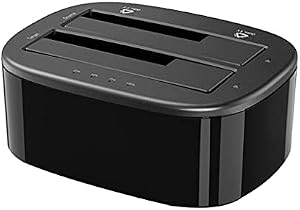
This dual bay docking station takes two 3.5 or 2.5 inch SATA HDD or SSD drives over USB 3.0, with offline clone stated for copying between its 2 bays without a computer. A 12V 3A power adapter powers the drives, an ON/OFF switch controls the unit, and an LED light indicates working status. Plug and play with hot-swapping is stated, but the listing is the sparsest of the five.
Pros
- Two bays with offline clone stated, one more bay than the A1DFDFGOQSFG dock
- 12V 3A power adapter included for the docked drives
- Hot-swapping and plug and play stated, with no drivers needed
Cons
- No dimensions or weight are stated, so size cannot be compared
- No drive capacity or clone speed is stated, unlike the StarTech’s 4.2 GB/min
Skip it if you need stated limits before buying; this listing gives no capacity ceiling and no clone speed.
| Spec | From the listing |
|---|---|
| Bays | 2 bays for 3.5/2.5 inch HDD/SSD |
| Connection | SATA to USB 3.0 |
| Power adapter | 12V 3A |
| Dimensions | The listing does not state it |
| Weight | The listing does not state it |
Shopping Checklist
Check the product page for current details before ordering. Before choosing a dock from this group, work through these steps:
- Count the bare drives you need connected at once, and match that to a stated bay count of 1, 2 or 4.
- Confirm your drives are 2.5 or 3.5 inch SATA, since every open dock here states SATA fit.
- Decide whether storage should be built into the dock or supplied by your own drives.
- Check the stated host connection against your computer: Thunderbolt 3, USB 3.2, USB 3.0 or eSATA.
- Compare finalists side by side on stated dimensions, and check the return window on the product page.
FAQ
Does a docking station include a hard drive?
Two of these five do: the LaCie 1big Dock states a built-in 24TB drive and the ORICO DataMatrix Mini states 22TB built in, as a 2TB SSD plus a 20TB hard drive. The other three docks are open bays for bare drives you supply, with no storage of their own stated.
What is the difference between a bay dock and a duplicator dock?
A bay dock connects bare drives to a computer for file access, like the single-bay A1DFDFGOQSFG unit. A duplicator dock also copies drives without the computer: the StarTech states standalone 1:3 cloning at up to 4.2 GB/min across 4 bays, and the ZjBfddnmm states offline clone across 2 bays.
Which connection speed should I check before buying?
Match the dock’s stated host connection to a port your computer has. The ORICO states the highest figure here at up to 10Gbps, the StarTech states 5 Gbps over USB or 3 Gbps over eSATA, and the other two open docks state USB 3.0 with no rate given.
Final Verdict
Choose the StarTech 4-Bay if cloning, erasing and multi-drive access on bare SATA drives is the job; its 4 bays and stated 4.2 GB/min cloning lead this group for that work. Choose the LaCie 1big Dock if one unit should hold 24TB and dock a laptop with up to 60W of charging, or the ORICO DataMatrix Mini for 22TB split between an SSD tier and a hard drive tier. The A1DFDFGOQSFG and ZjBfddnmm docks cover one-drive and two-drive access in simpler forms.
Prime covers fast, free delivery on eligible items. See whether a Prime free trial is available for your account.
Check Prime on Amazon →Related Guides
No related guides were supplied for this article.
Product and ASIN Reference
| Product | ASIN |
|---|---|
| LaCie 1big Dock 24TB | B0CNXX8NGW |
| StarTech 4-Bay Duplicator and Eraser | B005CQ12W2 |
| ORICO DataMatrix Mini 22TB | B0DK9BJY86 |
| A1DFDFGOQSFG SATA to USB 3.0 Dock | B0DQTNGV4L |
| ZjBfddnmm Dual Bay Docking Station | B0F7RFDFV5 |





Write Your Review
No reviews yet. Be the first to share your experience!