
Shoppers who want the most room on a single desk drive should start with the 28TB Seagate Expansion, while anyone who wants storage without a power outlet should look first at the bus-powered Seagate One Touch. The other three picks split along simpler lines: plug-and-play Windows use, Mac backup, and automatic setup on both systems.
All five products here are desktop external hard drives, so the choice comes down to stated capacity, footprint, weight, connection type and how each listing handles Windows and Mac computers. Stated capacities run from 18TB to 28TB, stated weights run from 1.98 pounds to 2.95 pounds among the four listings that state a weight, and one drive, the G-DRIVE, states no weight at all.
As an Amazon Associate, we earn from qualifying purchases.
Pick by Your Need
- Best overall: Seagate Expansion 28TB. It states the largest capacity of the five at 28TB.
- Best for Windows plug-and-play: WD Elements 20TB. The listing states plug-and-play readiness for Windows PCs.
- Best for Mac backup: G-Technology G-DRIVE 18TB. The listing states Time Machine readiness for file backup.
- Best for automatic setup: Seagate Expansion 24TB. The listing states automatic recognition of Windows and Mac computers.
- Best without a power outlet: Seagate One Touch 24TB. The listing states bus-powered USB-C operation with no wall outlet required.
Quick Answer
The Seagate Expansion 28TB states the most capacity and suits a single large archive. The Seagate One Touch 24TB is the pick when a free outlet is scarce, since its listing states bus-powered USB-C with one cord. The G-Technology G-DRIVE 18TB fits Mac users who want the listing’s stated Time Machine readiness in an all-aluminum case.
Comparison Table
| Product | Best for | Key stated figure | Trade-off |
|---|---|---|---|
| WD Elements 20TB | Windows plug-and-play | 20TB capacity, 1.98 pounds | The listing states reformatting is required for use with MacOS |
| Seagate Expansion 24TB | Automatic setup on Windows and Mac | 24TB capacity, 2.95 pounds | The Seagate Expansion 24TB listing states its interface two ways: USB 3.0 in the product name and USB 3.3 in the listing details. |
| G-Technology G-DRIVE 18TB | Mac backup | 18TB capacity, all-aluminum case | Smallest stated capacity of the five, and the listing states no weight |
| Seagate Expansion 28TB | Largest single archive | 28TB capacity, 2.59 pounds | The Seagate Expansion 28TB listing states its interface two ways: USB 3.0 in the product name and USB 3.2 in the listing details. |
| Seagate One Touch 24TB | Working without an outlet | 24TB capacity, bus-powered USB-C | Largest stated footprint of the five at 8.58 x 8.35 inches |
Decision Guide
If you need the largest stated capacity on one drive, choose the Seagate Expansion 28TB at 28TB. If you need a drive that runs without a wall outlet, choose the Seagate One Touch 24TB, the only listing here that states bus power over USB-C with a single cord. If you back up a Mac with Time Machine, choose the G-Technology G-DRIVE 18TB, which states Time Machine readiness, and note that both Seagate Expansion listings state reformatting is required for use with Time Machine.
If desk depth is limited, compare the stated heights: the G-DRIVE stands 1.39 inches tall, the One Touch 3.03 inches, the two Expansion drives 4.92 inches each, and the WD Elements 6.53 inches. If the drive will move between desks, the WD Elements states the lightest weight at 1.98 pounds, while the Seagate Expansion 24TB states the heaviest at 2.95 pounds; the G-DRIVE listing states no weight, so its portability cannot be judged from the listing. Before choosing either Seagate Expansion model, note the interface wording in its listing. The Seagate Expansion 24TB listing states its interface two ways: USB 3.0 in the product name and USB 3.3 in the listing details. The Seagate Expansion 28TB listing states its interface two ways: USB 3.0 in the product name and USB 3.2 in the listing details.
1. WD Elements 20TB Desktop Drive — Best for Windows Plug-and-Play

The WD Elements is the Windows-first pick of the five: its listing states plug-and-play readiness for Windows PCs and fast data transfers over USB 3.0. It holds 20TB, stands 6.53 inches tall on a 5.31 x 1.89 inch base, and at 1.98 pounds it is the lightest of the four listings that state a weight. Mac shoppers face an extra step, because the listing states reformatting is required for use with MacOS.
Pros
- Listing states plug-and-play readiness for Windows PCs
- Lightest stated weight of the five at 1.98 pounds
- USB 3.0 connection with fast data transfers, as the listing states
Cons
- Listing states reformatting is required for use with MacOS
- Tallest stated height of the five at 6.53 inches, so vertical clearance matters
| Spec | From the listing |
|---|---|
| Capacity | 20TB |
| Interface | USB 3.0 |
| Length | 5.31 inches |
| Width | 1.89 inches |
| Height | 6.53 inches |
| Weight | 1.98 pounds |
2. Seagate Expansion 24TB Desktop Drive — Best for Automatic Setup
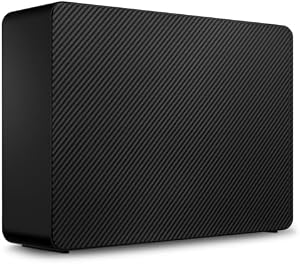
The Seagate Expansion 24TB aims at a simple first connection: the listing states automatic recognition of Windows and Mac computers and drag-and-drop file saving right out of the box, with a power adapter and USB cable to plug in. It holds 24TB, measures 7.04 x 1.65 x 4.92 inches, and states a weight of 2.95 pounds, the heaviest stated weight of the five. The Seagate Expansion 24TB listing states its interface two ways: USB 3.0 in the product name and USB 3.3 in the listing details. Its product name also states Rescue Data Recovery Services.
Pros
- Listing states automatic recognition of Windows and Mac computers
- Drag-and-drop file saving right out of the box, as the listing states
- Product name states Rescue Data Recovery Services
Cons
- Heaviest stated weight of the five at 2.95 pounds
- Listing states reformatting is required for use with Time Machine
| Spec | From the listing |
|---|---|
| Capacity | 24TB |
| Interface | Stated two ways in the listing |
| Length | 7.04 inches |
| Width | 1.65 inches |
| Height | 4.92 inches |
| Weight | 2.95 pounds |
3. G-Technology G-DRIVE 18TB — Best for Mac Backup

The G-DRIVE is the Mac-leaning option here: the listing states Time Machine readiness for easy file backup and a solid, all-aluminum case. It holds 18TB, the smallest stated capacity of the five, and its low, wide shape measures 7.72 x 5.06 x 1.39 inches, the shortest stated height of the group. The listing states high speed USB 3.0 for data transfer and gives no weight, so that field is blank in its spec table below.
Pros
- Listing states Time Machine readiness for file backup
- All-aluminum case, as the listing states
- Shortest stated height of the five at 1.39 inches
Cons
- Smallest stated capacity of the five at 18TB
- The listing does not state a weight
Skip it if your library already passes 18TB, since this is the smallest stated capacity of the five.
| Spec | From the listing |
|---|---|
| Capacity | 18TB |
| Interface | USB 3.0 |
| Length | 7.72 inches |
| Width | 5.06 inches |
| Height | 1.39 inches |
| Weight | The listing does not state it |
4. Seagate Expansion 28TB Desktop Drive — Best for the Largest Archive

The Seagate Expansion 28TB is the capacity leader of this group at 28TB, a full 4TB above the two 24TB drives. Like the 24TB Expansion, its listing states automatic recognition of Windows and Mac computers, drag-and-drop file saving right out of the box, and a power adapter and USB cable to plug in, and its product name states Rescue Data Recovery Services. It measures 1.65 x 7.04 x 4.92 inches and states a weight of 2.59 pounds. The Seagate Expansion 28TB listing states its interface two ways: USB 3.0 in the product name and USB 3.2 in the listing details.
Pros
- Largest stated capacity of the five at 28TB
- Listing states automatic recognition of Windows and Mac computers
- Product name states Rescue Data Recovery Services
Cons
- Listing states reformatting is required for use with Time Machine
- Heavier than the WD Elements, at a stated 2.59 pounds against 1.98 pounds
| Spec | From the listing |
|---|---|
| Capacity | 28TB |
| Interface | Stated two ways in the listing |
| Length | 1.65 inches |
| Width | 7.04 inches |
| Height | 4.92 inches |
| Weight | 2.59 pounds |
5. Seagate One Touch 24TB Desktop Drive — Best Without a Power Outlet

The One Touch removes the power adapter from the setup: its listing states bus-powered USB-C with no wall outlet required and one port, one cord, quick connect. It holds 24TB, level with the Seagate Expansion 24TB, and its product name states Rescue Recovery services and compatibility with most Windows and macOS systems. The trade-off is desk space, since its stated footprint of 8.58 x 8.35 inches is the largest of the five, and it stands 3.03 inches tall at a stated 2.59 pounds, level with the Expansion 28TB on weight.
Pros
- Listing states bus-powered USB-C with no wall outlet required
- One port and one cord, as the listing states
- Product name states compatibility with most Windows and macOS systems
Cons
- Largest stated footprint of the five at 8.58 x 8.35 inches
- The listing gives its color as Information Not Available
Skip it if your desk space is tight, because its stated footprint is the largest of the five.
| Spec | From the listing |
|---|---|
| Capacity | 24TB |
| Interface | USB-C |
| Length | 8.58 inches |
| Width | 8.35 inches |
| Height | 3.03 inches |
| Weight | 2.59 pounds |
Shopping Checklist
Check the product page for current details before ordering.
- Measure your desk space and compare it against each drive’s stated length, width and height.
- Match the stated capacity to the size of the library you plan to store, from 18TB to 28TB here.
- Confirm the connection type your computer needs, and read the interface wording on the product page.
- Check the Mac notes in each listing, since some state reformatting steps for MacOS or Time Machine.
- Check the return window on the product page before ordering, and compare your finalists side by side.
FAQ
Which of these drives states the most capacity?
The Seagate Expansion 28TB states the most at 28TB. The two 24TB drives, the Seagate Expansion 24TB and the Seagate One Touch 24TB, tie for second, followed by the WD Elements at 20TB and the G-DRIVE at 18TB.
Can any of these drives run without a power adapter?
The Seagate One Touch states bus-powered USB-C operation, so its listing states no wall outlet is required. The two Seagate Expansion listings describe plugging in a power adapter and a USB cable, so plan on a free outlet for either of those.
What should Mac users check before choosing?
The WD Elements listing states reformatting is required for use with MacOS, and both Seagate Expansion listings state reformatting is required for use with Time Machine. The G-DRIVE states Time Machine readiness, and the One Touch states compatibility with most macOS systems.
Final Verdict
For a single large archive, the Seagate Expansion 28TB leads on stated capacity at 28TB. For a desk with no free outlet, the Seagate One Touch 24TB is the only bus-powered option here. Mac users who back up with Time Machine should look at the G-DRIVE 18TB, while Windows users who want the simplest stated setup can choose between the plug-and-play WD Elements 20TB and the automatically recognized Seagate Expansion 24TB.
Prime covers fast, free delivery on eligible items. See whether a Prime free trial is available for your account.
Check Prime on Amazon →Related Guides
No related guides were supplied for this article, so this section contains no links.
Product and ASIN Reference
| Product | ASIN |
|---|---|
| WD Elements 20TB Desktop External Hard Drive | B09VCXWPQG |
| Seagate Expansion 24TB External Hard Drive | B0DVM1Z46T |
| G-Technology G-DRIVE 18TB Desktop External Hard Drive | B08FT44LFD |
| Seagate Expansion 28TB External Hard Drive | B0DW92YSB6 |
| Seagate One Touch 24TB External Hard Drive | B0FH5PM68Z |





Write Your Review
No reviews yet. Be the first to share your experience!