
Pick an officially licensed drive if stated PlayStation approval matters most to you, a 2TB model if capacity comes first, and the Lexar ES3 if you also need one drive for a phone, laptop and console. All five drives in this comparison state PS5 compatibility in their listings, so none is a mismatch for the keyword. They split instead on capacity, stated speed, size and connection style.
Three drives carry an officially licensed statement: the two SanDisk Extreme models and the Buffalo 2.0TB stick. The Buffalo 1TB and the Lexar ES3 state compatibility with PS5 without that licensed wording.
As an Amazon Associate, we earn from qualifying purchases.
Pick by Your Need
- Best overall: SanDisk 1TB Extreme Portable SSD. It states official licensing for PlayStation 5 and a white case at 3.97 x 2.07 x 0.38 inches.
- Best for stated speed detail: Lexar ES3 1TB Portable SSD. It states 1050MB/s read and 1000MB/s write over USB 3.2 Gen 2.
- Best for cable-free connection: Buffalo External SSD 2.0TB Stick. Its stick design connects without a cable and states official licensing for PS5 and PS4.
- Best for cross-device use: Buffalo External SSD 1TB. It states compatibility with PS4, PS5, Windows and Mac in one black drive.
- Best for more game room: SanDisk 2TB Extreme Portable SSD. It doubles the 1TB capacity while stating the same case dimensions as the 1TB SanDisk.
Quick Answer
Choose the SanDisk Extreme in 1TB or 2TB if you want stated official licensing, or the Lexar ES3 if stated read and write figures matter more. The Buffalo stick suits a cable-free setup, and the Buffalo 1TB suits shared console and computer use.
Comparison Table
| Product | Best for | Key stated figure | Trade-off |
|---|---|---|---|
| SanDisk 1TB Extreme Portable SSD | Stated official licensing at 1TB | 1TB; 3.97 x 2.07 x 0.38 inches | The SanDisk 1TB listing states its transfer speed two ways: up to 1050MB/s in the product name and up to 1000MB/s in the listing details. |
| Buffalo External SSD 1TB | Console and computer sharing | 1 TB; 4.6 x 3.0 x 0.5 inches | Largest case of the five, and the listing states no transfer speed figure and no weight |
| Lexar ES3 1TB Portable SSD | Stated read and write speeds | 1TB; up to 1050MB/s read, 1000MB/s write | No officially licensed statement, and MagSafe is stated as not available on this version |
| SanDisk 2TB Extreme Portable SSD | Stated official licensing at 2TB | 2TB; 3.97 x 2.07 x 0.38 inches | The SanDisk 2TB listing states its transfer speed two ways: up to 1050MB/s in the product name and up to 1000MB/s in the listing details. |
| Buffalo External SSD 2.0TB Stick | Cable-free 2TB connection | 2.0TB; 2.7 x 0.4 x 0.9 inches | The listing states no transfer speed figure and no weight |
Capacity ties at each size, three at 1TB and two at 2TB. Weight is stated by only three listings: the Lexar ES3 is the lightest stated at 0.1 pounds, and the two SanDisk drives tie at 0.15 pounds.
Decision Guide
If stated official licensing is your first filter, narrow the choice to the two SanDisk Extreme drives and the Buffalo 2.0TB stick. Between the SanDisk pair, capacity decides: 1TB or 2TB in the same stated case size of 3.97 x 2.07 x 0.38 inches and the same stated weight of 0.15 pounds.
The SanDisk 1TB listing states its transfer speed two ways: up to 1050MB/s in the product name and up to 1000MB/s in the listing details. The SanDisk 2TB listing states its transfer speed two ways: up to 1050MB/s in the product name and up to 1000MB/s in the listing details. If you want a single stated read figure and a stated write figure, the Lexar ES3 states up to 1050MB/s read and 1000MB/s write over USB 3.2 Gen 2.
If you need 2TB without a cable, choose the Buffalo stick: at 2.7 inches long it is the shortest stated case of the five. If you need 1TB across a console and a computer, choose the Buffalo 1TB, and accept the largest stated case at 4.6 x 3.0 x 0.5 inches. If pocket size at 1TB matters most, the Lexar ES3 states 3.94 x 1.97 x 0.39 inches and 0.1 pounds.
1. SanDisk 1TB Extreme Portable SSD — Best Overall

This is the 1TB licensed option: the listing states the drive was designed, tested and approved for PlayStation consoles, and that it is officially licensed for PlayStation 5. Its white case measures 3.97 inches long, 2.07 inches wide and 0.38 inches high, at a stated weight of 0.15 pounds. The SanDisk 1TB listing states its transfer speed two ways: up to 1050MB/s in the product name and up to 1000MB/s in the listing details.
Pros
- States officially licensed status for PlayStation 5
- States 1TB capacity in a case 0.38 inches high
- States use as an archive for transferring games to PlayStation 5 internal storage
Cons
- Transfer speed is stated two ways in the listing, as noted above
- States no write speed figure separate from the transfer statement
| Spec | From the listing |
|---|---|
| Capacity | 1TB |
| Color | White |
| Dimensions | 3.97 x 2.07 x 0.38 inches |
| Weight | 0.15 pounds |
| PS5 statement | Officially licensed for PlayStation 5 |
| Cable | The listing does not state it |
2. Buffalo External SSD 1TB — Best for Console and Computer Sharing

This black drive states compatibility with PS4, PS5, Windows and Mac. Its case is the largest stated of the five at 4.6 inches long, 3.0 inches wide and 0.5 inches high. The listing states USB-C, USB-A and USB 3.2 connection support. It states no transfer speed figure and no weight.
Pros
- States compatibility with PS4, PS5, Windows and Mac
- States both USB-C and USB-A connection support
- States a shock-resistant design with drop protection
Cons
- Largest stated case of the five at 4.6 x 3.0 x 0.5 inches
- Listing states no transfer speed figure and no weight
Skip it if you need a stated transfer speed figure to compare drives, because this listing gives none.
| Spec | From the listing |
|---|---|
| Capacity | 1 TB |
| Color | Black |
| Dimensions | 4.6 x 3.0 x 0.5 inches |
| Weight | The listing does not state it |
| Connection | USB-C, USB-A, USB 3.2 |
| PS5 statement | Compatible with PS4 / PS5 |
3. Lexar ES3 1TB Portable SSD — Best for Stated Speed Detail
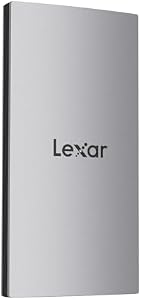
The ES3 is the only listing here that states both a read and a write figure: up to 1050MB/s read and 1000MB/s write over USB 3.2 Gen 2. Its silver case measures 3.94 inches long, 1.97 inches wide and 0.39 inches high, and at 0.1 pounds it is the lightest stated weight of the three listings that state a weight. Compatibility covers PS5, PS4, Xbox X|S, laptops, PCs, cameras, Android devices and the iPhone 17 series.
Pros
- States both read and write figures, up to 1050MB/s and 1000MB/s
- Lightest stated weight at 0.1 pounds among listings that state a weight
- States compatibility across consoles, computers, phones and cameras
Cons
- States compatibility with PS5 but no officially licensed statement
- Listing states MagSafe is not available in this version
| Spec | From the listing |
|---|---|
| Capacity | 1TB |
| Color | Silver |
| Dimensions | 3.94 x 1.97 x 0.39 inches |
| Weight | 0.1 pounds |
| Interface | USB 3.2 Gen 2 |
| Stated speeds | Up to 1050MB/s read, 1000MB/s write |
4. SanDisk 2TB Extreme Portable SSD — Best Licensed 2TB Option

This drive states the same licensing position as the 1TB SanDisk, officially licensed for PlayStation 5, with double the stated capacity at 2TB. The case figures match the 1TB model: 3.97 inches long, 2.07 inches wide, 0.38 inches high and 0.15 pounds stated. The SanDisk 2TB listing states its transfer speed two ways: up to 1050MB/s in the product name and up to 1000MB/s in the listing details.
Pros
- States 2TB capacity, tied for the highest stated capacity of the five
- States officially licensed status for PlayStation 5
- States the same compact case dimensions as the 1TB SanDisk
Cons
- Transfer speed is stated two ways in the listing, as noted above
- States no write speed figure separate from the transfer statement
Skip it if 1TB already covers your stated game library, because this model adds capacity and nothing else in its stated figures.
| Spec | From the listing |
|---|---|
| Capacity | 2TB |
| Color | White |
| Dimensions | 3.97 x 2.07 x 0.38 inches |
| Weight | 0.15 pounds |
| PS5 statement | Officially licensed for PlayStation 5 |
| Cable | The listing does not state it |
5. Buffalo External SSD 2.0TB Stick — Best Cable-Free Option

This black stick is the second 2TB drive and the only cable-free design: the listing states a compact USB stick form that connects directly to the console. At 2.7 inches long, 0.4 inches wide and 0.9 inches high, it has the shortest stated length and the narrowest stated width of the five. The listing states it is an officially licensed product for PS5 and PS4, and that PS5 game data and PS4 game titles can be saved onto it. It states no transfer speed figure and no weight.
Pros
- States 2.0TB capacity, tied for the highest stated capacity of the five
- States official licensing for use with PS5 and PS4 consoles
- Cable-free stick design, as stated in the listing
Cons
- Listing states no transfer speed figure and no weight
- Stick shape states a 0.9 inch height, thicker than the flat cases of the other four
| Spec | From the listing |
|---|---|
| Capacity | 2.0TB |
| Color | Black |
| Dimensions | 2.7 x 0.4 x 0.9 inches |
| Weight | The listing does not state it |
| Connection | USB3.2 Gen2 Type A |
| PS5 statement | Officially licensed; compatible with PS5 / PS4 |
Shopping Checklist
Check the product page for current details before ordering.
- Confirm the stated capacity, 1TB or 2TB, against the size of the game library you plan to store.
- Check whether the listing states official licensing for PlayStation 5 or only compatibility with PS5.
- Compare stated dimensions and weight where given, and note which listings state no weight.
- Check the stated connection type, USB-C, USB-A or a cable-free stick, against the ports you plan to use.
- Read the return window on the product page before ordering.
FAQ
Does every drive here state PS5 compatibility?
Yes, all five listings state PS5 compatibility in some form. Three go further and state official licensing for PlayStation consoles: the two SanDisk Extreme drives and the Buffalo 2.0TB stick. The Buffalo 1TB and the Lexar ES3 state compatibility with PS5 without that licensed wording.
Which capacity should I choose, 1TB or 2TB?
Three listings state 1TB and two state 2TB, so capacity alone leaves a tie at each size. Break a 1TB tie on stated speed detail or device list, and break a 2TB tie on form: the SanDisk 2TB is a flat cased drive, while the Buffalo 2.0TB is a cable-free stick.
Why do the two SanDisk listings show two speed figures?
Each SanDisk listing gives one figure in its product name and a lower figure in its listing details, and this article reports both rather than picking one. The Lexar ES3 gives one stated read figure and one stated write figure. The two Buffalo listings state no transfer speed figure at all.
Final Verdict
For stated official licensing with a flat case, pick the SanDisk Extreme in the capacity you need, 1TB or 2TB, and read both of its stated speed figures before deciding. For a single stated read and write pair plus the lightest stated weight, pick the Lexar ES3. For 2TB without a cable, pick the Buffalo stick, and for one 1TB drive shared between console and computer, pick the Buffalo 1TB.
Prime covers fast, free delivery on eligible items. See whether a Prime free trial is available for your account.
Check Prime on Amazon →Related Guides
No related guides were supplied for this article, so this section contains no links.
Product and ASIN Reference
| Product | ASIN |
|---|---|
| SanDisk 1TB Extreme Portable SSD | B0DQWHWWNS |
| Buffalo External SSD 1TB | B0932J2L8N |
| Lexar ES3 1TB Portable SSD | B0DYDHLN81 |
| SanDisk 2TB Extreme Portable SSD | B0DQWTLPSJ |
| Buffalo External SSD 2.0TB Stick | B0C353JD3M |

Write Your Review
No reviews yet. Be the first to share your experience!