
If you want the largest stated screen for long code files, pick one of the two 32-inch BenQ models; if you want smoother scrolling, pick the RD280UG, the only model here whose listing states a 120Hz refresh rate. Every model in this group is a BenQ programming monitor with a Nano Matte Panel and coding modes, so the real choice comes down to screen size, resolution, stand type and which extra features each listing actually states.
Two models state a 3840×2160 resolution, two state 3840×2560, and one states 4K+ without a pixel count. Stated weights split the group cleanly: three models state 16.8 pounds, while the two 32-inch models state 34.17 pounds each. Read the sections below for the figures each listing gives, including the places where a listing gives no figure at all.
As an Amazon Associate, we earn from qualifying purchases.
Pick by Your Need
- Best overall: BenQ RD280U. It pairs a stated 3840×2560 resolution with KVM switching and 90W USB-C.
- Best for fast scrolling: BenQ RD280UG. Its listing states a 120Hz refresh rate for code navigation.
- Best large screen: BenQ RD320UA. It states a 32-inch screen at 3840×2160 with a MoonHalo backlight.
- Best low height: BenQ RD320U. Its stated height of 10.2 inches is the lowest of the five.
- Best adjustable stand: BenQ RD280UA. Its listing states an Ergo Flexible Arm for screen positioning.
Quick Answer
For most programmers, the RD280U is the balanced pick: it states a 3840×2560 resolution, a 3:2 aspect ratio, KVM switching and 90W USB-C at a stated weight of 16.8 pounds. Choose the RD280UG instead if a stated 120Hz refresh rate matters more than a stated pixel count, and choose either 32-inch model if a larger stated screen matters more than desk weight.
Comparison Table
| Product | Best for | Key stated figure | Trade-off |
|---|---|---|---|
| BenQ RD280U | Single-cable desk with KVM | 3840×2560 resolution, 3:2 aspect ratio | States no refresh rate |
| BenQ RD280UG | Smooth scrolling through code | 120Hz refresh rate | Its name states a 28.2-inch screen while its spec table states a size of 28.0, so its screen size is not settled |
| BenQ RD320UA | Large-screen coding | 32-inch screen, 3840×2160 | Joint-heaviest stated weight at 34.17 pounds |
| BenQ RD320U | 32-inch screen in a low outline | 10.2-inch stated height | States the same 34.17-pound weight as the RD320UA |
| BenQ RD280UA | Repositioning the screen often | Ergo Flexible Arm stand | Tallest stated outline at 27.0 inches high |
Decision Guide
If you need the most code on screen at once, choose one of the 32-inch models: both the RD320UA and the RD320U state a 32-inch screen at 3840×2160 and a 2000:1 contrast ratio. Between those two, the stated difference is height: the RD320UA states 18.0 inches high, while the RD320U states 10.2 inches high, with length, width and weight stated identically at 28.0 inches, 23.0 inches and 34.17 pounds.
If you need a stated refresh rate for scrolling and cursor movement, choose the RD280UG: it is the only listing here that states one, at 120Hz. Its name states a 28.2-inch screen while its spec table states a size of 28.0, so its screen size is not settled, and its listing states no pixel count beyond 4K+, so weigh it on the refresh rate and its stated 3:2 aspect ratio rather than on size. It is also the shallowest stated model at 3.4 inches long.
If you need to switch one keyboard and mouse between two computers, choose the RD280U: its listing states KVM, and no other listing in this group states it. If you need to move the screen itself rather than your chair, choose the RD280UA, the only model whose listing states an Ergo Flexible Arm. If stated weight decides it, the RD280U, RD280UG and RD280UA tie as the lightest stated at 16.8 pounds each, against 34.17 pounds stated for each 32-inch model.
1. BenQ RD280U Programming Monitor — Best for KVM switching
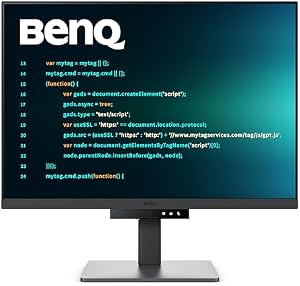
The RD280U is the only model here whose listing states KVM, and it pairs that with a stated 90W USB-C connection, a 3840×2560 resolution and a 3:2 aspect ratio across a 28.2-inch screen. Its listing describes a Nano Matte Panel as anti-glare and anti-reflective, plus a MoonHalo backlight and coding modes built for code differentiation. At 24.0 inches wide, 18.7 inches high and 16.8 pounds, it matches the other two lighter models on stated weight while stating a deeper 9.6-inch length than the RD280UG. Skip it if you want a stated refresh rate, because its listing states none.
Pros
- Only listing here that states KVM switching
- States 90W USB-C alongside a 3840×2560 resolution
- States a 3:2 aspect ratio for more vertical code lines
Cons
- Listing states no refresh rate
- States no contrast ratio, unlike the 2000:1 stated by three other models
| Spec | From the listing |
|---|---|
| Color | Metal Grey |
| Screen size | 28.2 inches |
| Length | 9.6 inches |
| Width | 24.0 inches |
| Height | 18.7 inches |
| Weight | 16.8 pounds |
2. BenQ RD280UG 120Hz Programming Monitor — Best for fast scrolling

The RD280UG stands apart on one stated figure: a 120Hz refresh rate, which its listing ties to smooth scrolling and cursor movement during code navigation. Its name states a 28.2-inch screen while its spec table states a size of 28.0, so its screen size is not settled, and the listing gives its resolution only as 4K+ with a 3:2 aspect ratio and a 2000:1 contrast ratio. It states the joint-lightest weight here, 16.8 pounds, a width of 24.0 inches, a height of 17.0 inches and the shallowest stated length of the group at 3.4 inches. Its listing describes the Nano Matte Panel as low reflection and the MoonHalo backlight as balanced illumination for extended sessions.
Pros
- Only listing here that states a refresh rate, at 120Hz
- States a 2000:1 contrast ratio
- Shallowest stated length of the five at 3.4 inches
Cons
- Screen size is not settled: name and spec table disagree
- Listing states no pixel count and no USB-C power figure
| Spec | From the listing |
|---|---|
| Color | Metal Grey |
| Screen size | The listing states conflicting figures |
| Length | 3.4 inches |
| Width | 24.0 inches |
| Height | 17.0 inches |
| Weight | 16.8 pounds |
3. BenQ RD320UA 32-Inch Programming Monitor — Best large screen

The RD320UA states the joint-largest screen here, 32 inches at 3840×2160, with a stated 2000:1 contrast ratio and a MoonHalo backlight whose color temperature, brightness and light modes its listing describes as customizable. Its listing also states Night Hours Protection, described as minimum brightness technology for night hours and dark room usage, plus coding modes with dark and light themes. The trade-off is size on the desk: it states 28.0 inches long, 23.0 inches wide, 18.0 inches high and 34.17 pounds, the joint-heaviest stated weight of the five. Skip it if your desk cannot take a stated 28.0-inch length.
Pros
- Joint-largest stated screen at 32 inches, 3840×2160
- States Night Hours Protection for dark room usage
- States 90W USB-C and a 2000:1 contrast ratio
Cons
- Joint-heaviest stated weight at 34.17 pounds
- Listing states no refresh rate and no KVM
| Spec | From the listing |
|---|---|
| Color | Metal Grey |
| Screen size | 32.0 inches |
| Length | 28.0 inches |
| Width | 23.0 inches |
| Height | 18.0 inches |
| Weight | 34.17 pounds |
4. BenQ RD320U 32-Inch Programming Monitor — Best low-profile 32-inch

On stated figures, the RD320U matches the RD320UA almost line for line: a 32-inch screen at 3840×2160, a 2000:1 contrast ratio, 90W USB-C, Night Hours Protection and coding modes with dark and light themes. The one stated difference is height: 10.2 inches against the RD320UA’s 18.0 inches, which makes this the lowest stated outline of all five models while its length, width and weight stay at 28.0 inches, 23.0 inches and 34.17 pounds. Its listing describes the Nano Matte Panel as low reflection and the backlight as supporting eye protection and focus during long sessions.
Pros
- Lowest stated height of the five at 10.2 inches
- Joint-largest stated screen at 32 inches, 3840×2160
- States Night Hours Protection and 90W USB-C
Cons
- Joint-heaviest stated weight at 34.17 pounds
- Listing states no refresh rate and no stand adjustment details
| Spec | From the listing |
|---|---|
| Color | Metal Grey |
| Screen size | 32.0 inches |
| Length | 28.0 inches |
| Width | 23.0 inches |
| Height | 10.2 inches |
| Weight | 34.17 pounds |
5. BenQ RD280UA with Ergo Arm — Best adjustable stand

The RD280UA is the stand-out for positioning: its listing states an Ergo Flexible Arm, described as giving the screen an optimal position with wide flexibility, where the other four listings state no arm. The screen figures match the RD280U: a 28.2-inch screen at 3840×2560, 90W USB-C, advanced coding modes and a MoonHalo backlight, with the panel described in its listing facts as a Nano Matte Panel. Its stated outline is the tallest here at 27.0 inches high, with a stated length of 18.0 inches, a width of 24.0 inches and the joint-lightest stated weight of 16.8 pounds.
Pros
- Only listing here that states an Ergo Flexible Arm
- States 3840×2560 resolution with 90W USB-C
- Joint-lightest stated weight at 16.8 pounds
Cons
- Tallest stated outline at 27.0 inches high
- Listing states no refresh rate, no contrast ratio and no KVM
| Spec | From the listing |
|---|---|
| Color | Metal Grey |
| Screen size | 28.2 inches |
| Length | 18.0 inches |
| Width | 24.0 inches |
| Height | 27.0 inches |
| Weight | 16.8 pounds |
Shopping Checklist
Check the product page for current details before ordering. Then work through the points below against the figures each listing states.
- Measure your desk depth and compare it with each model’s stated length, which runs from 3.4 inches to 28.0 inches here.
- Check the stated screen size and resolution you are actually getting, and note where a listing states no pixel count.
- Check the stated height against your shelf or monitor riser clearance, from 10.2 inches to 27.0 inches across these five.
- Check which connections each listing states, such as 90W USB-C or KVM, before assuming a cable or switch is included.
- Check the stated weight against what your desk or mount is rated to hold.
- Compare your finalists side by side on the figures that matter to your setup.
FAQ
Which of these monitors states a refresh rate?
Only the BenQ RD280UG listing states a refresh rate, at 120Hz, tied to smooth scrolling and cursor movement. The other four listings state no refresh rate, so if that figure matters to you, the RD280UG is the only one of the five you can compare on it.
What is the difference between the two 32-inch models?
On stated figures, very little: both state a 32-inch screen at 3840×2160, a 2000:1 contrast ratio, 90W USB-C, Night Hours Protection and a weight of 34.17 pounds. The stated difference is height: the RD320UA states 18.0 inches, while the RD320U states 10.2 inches.
Do all five monitors state USB-C power delivery?
No. Four listings state 90W USB-C: the RD280U, RD320UA, RD320U and RD280UA. The RD280UG listing states no USB-C power figure, so do not assume it delivers the same 90 watts to a connected laptop.
Final Verdict
All five are BenQ programming monitors with Nano Matte Panels and coding modes, so the decision rests on the figures each listing states. Pick the RD280U for KVM and a 3:2 screen, the RD280UG for the only stated refresh rate at 120Hz, either 32-inch model for the largest stated screen, and the RD280UA if an Ergo Flexible Arm matters more than a low outline. Where a listing states no figure, treat that as unknown rather than assumed.
Prime covers fast, free delivery on eligible items. See whether a Prime free trial is available for your account.
Check Prime on Amazon →Related Guides
No internal links were supplied for this post, so this section lists none.
Product and ASIN Reference
| Product | ASIN |
|---|---|
| BenQ RD280U | B0D2PDYHD9 |
| BenQ RD280UG | B0G38RCQKN |
| BenQ RD320UA | B0DFCYXMD3 |
| BenQ RD320U | B0DFD2Q8F1 |
| BenQ RD280UA | B0D2PHW5Y8 |

Write Your Review
No reviews yet. Be the first to share your experience!